
If you have been using AI coding agents (Claude Code, Cursor, GitHub Copilot) you have probably noticed something unsettling. These agents make dozens of technical decisions per session, and none of them get documented.
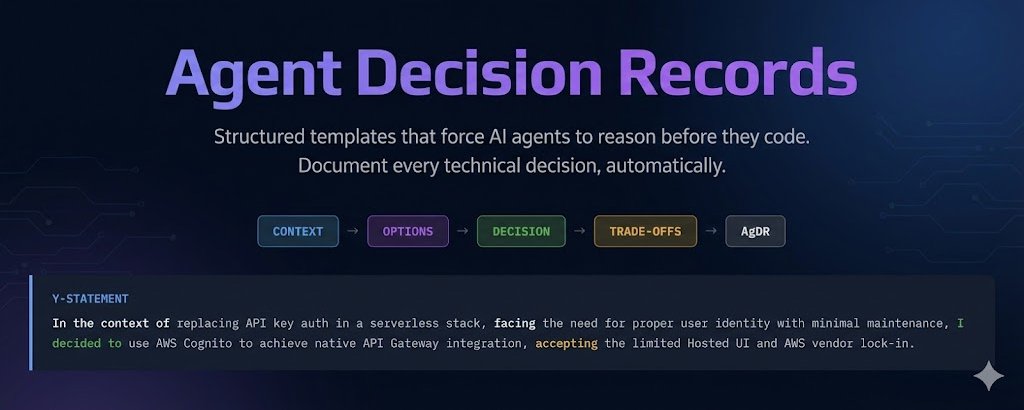
They pick a library, choose an architecture pattern, design a database schema, and move on. The code lands in a PR, the team reviews it, and nobody asks: why this approach and not the other three?
That invisible decision-making is a problem. Not because the decisions are bad (they are often quite good) but because six months from now, when someone needs to change that auth provider or restructure that database, there is zero context on why things were built this way.
Agent Decision Records (AgDR) fix this. They extend the proven Architecture Decision Record format for AI-assisted development, forcing structured documentation at the moment a decision is made.
This post covers how AgDR works, shows real production examples, and explains how to wire it into your AI development workflow.
The Problem: Invisible Decisions at Machine Speed
Architecture Decision Records have been a staple of good engineering practice for years. Michael Nygard introduced the concept back in 2011, and teams that use them consistently report better onboarding, fewer "why did we do this?" conversations, and more deliberate technical choices.
But ADRs were designed for humans making decisions at human speed. A developer researches options over a few days, discusses with the team, and writes up the decision. The process has natural friction that forces thoughtfulness.
AI agents operate differently. In a single session, an agent might:
- Choose an authentication provider
- Design a database key schema
- Pick a state management approach
- Select a testing framework
- Decide on a migration strategy
Each of those is a meaningful technical decision with trade-offs. Each one affects the project for months or years. And each one disappears into the commit history with no record of what alternatives were considered or why they were rejected.
The result is a codebase full of decisions that nobody can explain. Not the developer who prompted the agent, not the agent itself (it has no memory between sessions), and not the team that inherits the code.
What AgDR Is
AgDR is a lightweight extension of the ADR format, purpose-built for AI-assisted development. It keeps what works about ADRs (structured format, version-controlled, close to the code) and adds what is needed for agent workflows:
- Agent metadata (model, session, trigger) for traceability
- A Y-statement summary that captures the decision in one sentence
- A structured options table that forces explicit comparison
- A template that agents can fill out mid-session without breaking flow
The full specification and templates live on GitHub: github.com/me2resh/agent-decision-record
The Y-Statement Format
Every AgDR opens with a Y-statement. A single sentence that captures the decision:
In the context of [situation], facing [concern], I decided [decision] to achieve [goal], accepting [tradeoff].
This format forces clarity. You cannot write a Y-statement without understanding the context, the trade-off, and the cost. It also makes decisions scannable. A new team member can read ten Y-statements in two minutes and understand the major architectural choices.
The Template
---
id: AgDR-{NNNN}
timestamp: {ISO-8601}
agent: {claude-code | cursor | copilot}
model: {model-id}
trigger: {user-prompt | hook | automation}
status: {proposed | executed | superseded}
---

# {Short descriptive title}

> In the context of {situation}, facing {concern},
> I decided {decision} to achieve {goal}, accepting {tradeoff}.

## Context
- What problem are we solving?
- What constraints exist?

## Options Considered
| Option | Pros | Cons |
|--------|------|------|
| Option A | ... | ... |
| Option B | ... | ... |

## Decision
Chosen: **{Option}**, because {specific justification}.

## Consequences
- What changes as a result
- What tradeoffs we accept
Real Examples
I built AgDR while working with Claude Code on production serverless projects. Here are three anonymised decisions that illustrate how it works in practice.
Example 1: Auth Provider Selection
The agent needed to choose authentication for a Chrome extension with an AWS serverless backend. Four options were on the table:
AgDR-0001 | claude-code | user-prompt | executed
Auth Provider for Serverless Chrome Extension
In the context of replacing API key auth in a 100% AWS serverless stack, facing the need for proper user identity with minimal maintenance, I decided to use AWS Cognito to achieve native API Gateway integration and managed security, accepting the limited Hosted UI aesthetics and AWS vendor lock-in.
Options Considered
| Option | Pros | Cons |
|---|---|---|
| AWS Cognito | Native API GW authorizer, free 50K MAU, SAM integration | Basic Hosted UI, AWS lock-in |
| Auth0 | Polished UI, excellent DX, 7.5K MAU free | External vendor, custom authorizer needed |
| Firebase Auth | Simple SDK, good extension support | Mixes GCP+AWS, custom authorizer |
| Custom JWT | Full control | Must build everything: hashing, refresh, reset |
Decision: Chosen AWS Cognito, because the built-in API Gateway authorizer eliminates all custom auth middleware, the entire stack stays single-vendor AWS, and the 50K MAU free tier makes cost effectively zero.
The key insight: without AgDR, the agent would have just installed Cognito and moved on. The PR reviewer would see Cognito config and wonder "why not Auth0?" Now the reasoning is documented.
Example 2: DynamoDB Key Design
This one shows AgDR handling a database design decision, the kind of choice that is expensive to reverse:
AgDR-0002 | claude-code | user-prompt | executed
DynamoDB Key Design: Workspace-Partitioned Single Table
In the context of introducing a Workspace aggregate root in a DynamoDB single-table design, facing the choice between workspace-partitioned keys, entity-first keys, or GSI overloading, I decided to use workspace-partitioned keys (PK=WORKSPACE#<id>) to achieve natural aggregate boundaries and single-query loading, accepting the need for a GSI to list user's workspaces.
Options Considered
| Option | Pros | Cons |
|---|---|---|
| Workspace-partitioned | Single query for full aggregate, O(1) membership check | Need GSI for cross-workspace queries |
| Entity-first | Each entity independent, easy global queries | Breaks aggregate boundary, scatter-gather reads |
| GSI overloading | Minimal change from v1 | Complex, domain not modeled in keys |
Six months later, when someone asks "why does every query use PK=WORKSPACE#<id>?", the answer is in docs/agdr/AgDR-0002-dynamo-partition-key-design.md.
Example 3: Data Migration Strategy
The agent needed to migrate DynamoDB items from an old key format to a new one. Three approaches, each with real tradeoffs:
AgDR-0003 | claude-code | user-prompt | executed
Migration Strategy: Copy-on-First-Login
In the context of migrating DynamoDB data from v1 to v2 key format, facing the choice between automatic copy-on-login, a manual script, or lazy dual-read, I decided to use copy-on-first-login to achieve fully automatic zero-downtime migration, accepting ~2-3s first-call latency and lingering old items until cleanup.
Options Considered
| Option | Pros | Cons |
|---|---|---|
| Copy-on-first-login | Automatic, non-destructive, idempotent | 2-3s first call, old items linger |
| Manual script | Clean, runs once | Destructive, manual coordination |
| Lazy dual-read | No big-bang | Complex forever, items never fully migrate |
This decision directly impacted user experience (that 2-3 second first login). Documenting the tradeoff made it a deliberate choice, not an accident.
How to Integrate AgDR Into Your Workflow
Claude Code: The /decide Skill
The approach I use is a /decide skill that triggers whenever the agent is about to make a technical choice. Add trigger patterns to your CLAUDE.md:
### Trigger Patterns (STOP if you catch yourself doing these)

If you are about to:
- Say "I'll use X" or "Let's go with X" -> STOP, run /decide first
- Compare "X vs Y" -> STOP, run /decide first
- Choose a library, framework, or tool -> STOP, run /decide first
- Pick an implementation approach -> STOP, run /decide first
The /decide skill walks through a structured flow: define the problem, list options, compare them, write the Y-statement, and save the AgDR file.
Cursor: .cursor/rules/
Drop the AgDR rule into your project's .cursor/rules/ directory as an MDC file with alwaysApply: true. The rule automatically detects decision patterns and creates AgDR documents.
GitHub Copilot
Add repository-wide instructions in .github/copilot-instructions.md plus path-specific rules in .github/instructions/agdr.instructions.md for the AgDR template format.
Windsurf
Add a Cascade rule in .windsurf/rules/agdr.md with trigger: always_on for continuous AgDR enforcement.
Git Hooks
A pre-commit hook warns when architecture-significant files change without an AgDR:
#!/bin/bash
ARCH_FILES=$(git diff --cached --name-only | grep -E '(schema|migration|config|infra)')
AGDR_FILES=$(git diff --cached --name-only | grep -E 'agdr/AgDR-')

if [ -n "$ARCH_FILES" ] && [ -z "$AGDR_FILES" ]; then
  echo "WARNING: Architecture files changed without an AgDR."
  echo "Consider running /decide to document the decision."
fi
Results From Production Use
After several months of using AgDR across multiple projects:
PR reviews got faster and better. Reviewers stopped asking "why did you choose X?" because the AgDR link was right there in the PR description. Reviews shifted from questioning decisions to evaluating implementation quality.
Decision traceability became trivial. When revisiting a project after weeks away, ls docs/agdr/ gives an instant map of every significant technical choice. The Y-statements are scannable in under a minute.
Onboarding accelerated. New contributors (human or AI) can read the AgDR directory and understand the project's technical foundations without archaeology through git blame and Slack threads.
The agent made better decisions. This was the unexpected benefit. Forcing the agent to explicitly compare options and articulate trade-offs before coding led to more thoughtful choices. The structure acts as a reasoning scaffold.
Fewer "let me redo this" moments. When the decision is documented before implementation, there is a natural checkpoint where the human can say "actually, let's go with Option B." Without AgDR, you discover the agent's choice after it has written 500 lines of code.
Get Started
The AgDR specification, templates, and integration guides are all open source:
GitHub: github.com/me2resh/agent-decision-record
The repo includes:
- Full AgDR template (standard and short formats)
- 6 anonymised example records from real projects
- Claude Code
/decideskill - Cursor MDC rule (
.cursor/rules/) and legacy.cursorrules - GitHub Copilot instructions (repository-wide and path-specific)
- Windsurf Cascade rule
- System prompts for any AI assistant
- Pre-commit git hooks
- Contributing guide
If you are using AI agents for anything beyond trivial code generation, you need a way to capture the decisions they make. AgDR is a lightweight, proven approach that fits into existing developer workflows.
Try it on your next project. Add the trigger patterns to your agent's system prompt. Run /decide before your next architectural choice. Read the AgDR a month later and tell me it was not worth the two minutes it took to create.
AgDR is open source under CC BY 4.0. Contributions, feedback, and real-world examples are welcome.